We Scored 100 on Lighthouse. Here Is the Code Behind It.
How we rebuilt loadtestexperts.com to score 100 across Performance, Accessibility, Best Practices, and SEO — on a small VPS, without a managed CDN.
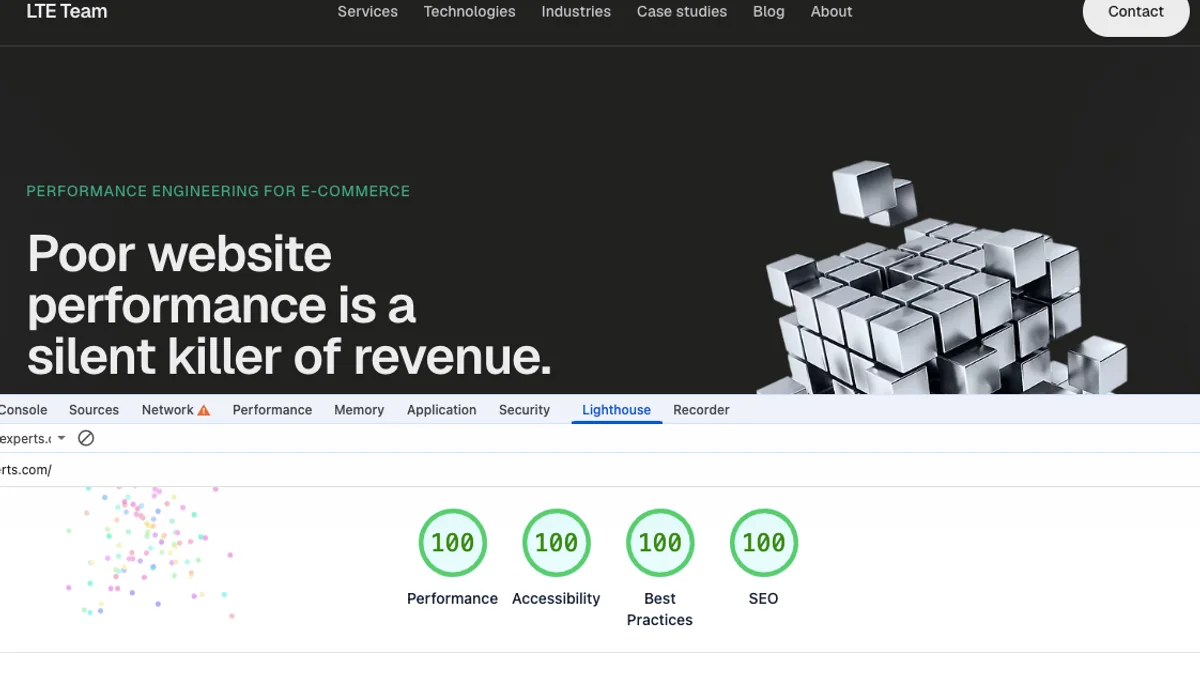
There is a view that pointing out performance problems feels like criticism — and criticism without a counter-example is easy to dismiss. A consultant flags slow pages, bloated JavaScript, missing metadata. The team nods, files a ticket, moves on. Nothing changes until the next audit surfaces the same issues.
We prefer to turn the board around.
At Load Test Experts Team, we audit performance for a living. When we rebuilt our own site, we did not stop at the report. We shipped a production application that scores 100 across every Lighthouse category — Performance, Accessibility, Best Practices, and SEO — on a small VPS we run ourselves. No Vercel edge. No managed CDN. No infinite budget.
That score is not a vanity metric. It is proof that disciplined engineering works under real constraints — the same constraints many e-commerce and SaaS teams face when they cannot simply throw hardware at the problem.
Poor website performance is a silent killer of revenue. Every second of delay costs customers. We optimise e-commerce applications for speed, stability, and search rankings. This article walks through the practices we applied to our own site, with the code to back them up.
Performance: Node Should Not Serve Your JavaScript
Lighthouse Performance is not about chasing a number in Chrome DevTools. It is about where work happens — at build time, at the edge, or on a stressed Node process at 2 a.m. when traffic spikes.
Static-first rendering
Most of our pages are pre-rendered at build time or revalidated on a schedule, not generated on every request. The homepage revalidates every hour; marketing pages are forced static. Blog posts are built for every slug at deploy time.
// Homepage — ISR every 3600 seconds
export const revalidate = 3600;

// Marketing pages — fully static at build time
export const dynamic = "force-static";
When a visitor hits /about, nginx or Next.js serves HTML that already exists. Node does not compile a React tree on the fly. That keeps CPU free for the requests that genuinely need it.
An intentional image trade-off
Next.js can optimise images at runtime with Sharp. In production, we watched that choice cause real 502 errors — Node stopped responding under image-processing load. So we made a deliberate trade: pre-built WebP assets in /public, and runtime optimisation turned off.
// next.config.ts
const nextConfig: NextConfig = {
  output: "standalone",
  images: {
    // Assets in /public are already WebP. Runtime optimisation (Sharp) is CPU-heavy
    // and can overwhelm a constrained server, causing nginx 502s when Node stops responding.
    unoptimized: true,
  },
};
This looks wrong on a checklist until you read the production logs. Performance engineering is systems thinking: the fastest option in theory is not always the fastest option in production.
LCP: treat the hero image as infrastructure
The Largest Contentful Paint element on our homepage is the logo in the hero. We give it explicit dimensions, responsive sizes, and priority so the browser fetches it immediately — no layout shift, no waiting behind lower-priority assets.
<Image
  src={logo.src}
  alt={logo.alt}
  width={560}
  height={560}
  priority
  sizes="(max-width: 1024px) 100vw, 560px"
  className="h-auto w-full max-w-md lg:max-w-none"
/>
Below-the-fold images on blog cards omit priority. The browser lazy-loads them by default. Not every optimisation requires a library — sometimes it is knowing what not to load first.
Fonts without layout shift
We load Geist via next/font/google, self-hosted at build time. No external font CDN request. No flash of unstyled text that shifts the layout.
const geistSans = Geist({
  variable: "--font-geist-sans",
  subsets: ["latin"],
  display: "swap",
  preload: true,
});
A small CSS detail completes the picture: scrollbar-gutter: stable on html prevents the page from jumping sideways when the scrollbar appears. Cumulative Layout Shift is often won in margins this small.
Minimal client JavaScript
The entire site has only a handful of "use client" components — mainly interactive UI chrome. Everything else — headers, footers, blog content, case studies — is a Server Component. Less JavaScript shipped to the browser means faster parse, less main-thread work, and a smaller attack surface.
nginx serves static assets; Node serves HTML
The highest-impact production change was routing /_next/static/ and /images/ through nginx directly from disk. Node handles HTML and API routes only. Static files get a one-year immutable cache.
# Static assets — serve from disk so Node only handles HTML/API
location /_next/static/ {
    alias /var/www/app/current/.next/static/;
    expires 365d;
    add_header Cache-Control "public, max-age=31536000, immutable";
    access_log off;
}

location /images/ {
    alias /var/www/app/current/public/images/;
    expires 30d;
    add_header Cache-Control "public, max-age=2592000";
    access_log off;
}
We also run HTTP/2 and HTTP/3 (QUIC), gzip compression for text assets, and a keepalive pool to the upstream Node process. Transport efficiency matters on every page load.
Resource limits prevent death spirals
Node runs under tight memory limits via systemd. If memory pressure builds, the process restarts cleanly instead of dragging the entire server into swap. On a small VPS, leaving headroom for nginx and the OS is not optional.
Environment=NODE_OPTIONS=--max-old-space-size=<heap-limit>
Environment=HOSTNAME=127.0.0.1
MemoryHigh=<soft-cap>
MemoryMax=<hard-cap>
Node listens on localhost only. It is never directly exposed to the internet.
Accessibility: Fast Means Nothing If People Cannot Use the Site
A perfect Performance score does not help a screen-reader user who cannot navigate your site, or a keyboard user who cannot reach your call to action. Accessibility is legal exposure for businesses and lost revenue from excluded customers. For engineers, the good news is that semantic HTML is cheap — and it compounds with SEO.
Language and landmarks
Every page declares its language on the root element. Content lives inside landmark regions: main for primary content, nav for navigation, article for blog posts. Screen readers and search engines use these to understand page structure without parsing CSS class names.
<html lang="en" className={`${geistSans.variable} h-full bg-background antialiased`}>
  <body>
    <Header />
    <div className="flex flex-1 flex-col">{children}</div>
    <Footer />
  </body>
</html>
Navigation is explicitly labelled:
<nav aria-label="Main navigation">
  <ul>
    {navItems.map((item) => (
      <li key={item.href}>
        <Link href={item.href}>{item.label}</Link>
      </li>
    ))}
  </ul>
</nav>
Sections tied to headings
Long pages use aria-labelledby to connect sections to their headings. A screen-reader user jumping between landmarks hears the section title instead of an anonymous block of text.
<section aria-labelledby="expertise">
  <h2 id="expertise">What we specialise in</h2>
  {/* section content */}
</section>
Meaningful structure for data
Statistics on the homepage are not a grid of div elements. They are a definition list — term and description pairs that assistive technology understands natively.
<dl className="grid gap-6 sm:grid-cols-2 lg:grid-cols-4">
  {stats.map((stat) => (
    <div key={stat.label}>
      <dt>{stat.label}</dt>
      <dd>{stat.value}</dd>
    </div>
  ))}
</dl>
The hero logo carries a descriptive alt attribute. Decorative icons in contact options are marked aria-hidden="true" so they do not clutter the accessibility tree. Headings use text-balance and body copy uses text-pretty — typographic details that improve readability for everyone, not only assistive technology users. Accessibility was not a post-launch audit item. It was part of how we wrote components from the first commit.
SEO: Discoverability Is Engineered, Not Sprinkled On at the End
Search optimisation on our site is not a plugin or a monthly checklist. It is a metadata system, a sitemap generator, structured data, and canonical URLs — all wired into the build.
A central metadata factory
Every page calls generateMetadata() and passes overrides into a single buildMetadata() function. Title, description, canonical URL, Open Graph image, robots directives, and article fields all flow through one place. No copy-pasted meta tags. No page left behind.
export function buildMetadata(overrides: SeoInput): Metadata {
  return mergeObjects(baseMetadata, {
    title: overrides.title,
    description: overrides.description,
    alternates: overrides.canonical
      ? { canonical: overrides.canonical }
      : undefined,
    robots: overrides.noindex
      ? { index: false, follow: false }
      : { index: true, follow: true },
    openGraph: {
      title: overrides.title,
      description: overrides.description,
      url: overrides.canonical,
      publishedTime: overrides.publishedTime,
      authors: overrides.authors,
      images: overrides.ogImage ? [{ url: overrides.ogImage }] : undefined,
    },
  });
}
The 404 page is explicitly noindex. Blog posts set publishedTime and author metadata. Every detail page gets a canonical URL.
Structured data (JSON-LD)
Search engines receive machine-readable context alongside human-readable HTML. The root layout embeds an Organization schema. Blog posts include Article and BreadcrumbList schemas. No extra network requests — the JSON-LD is inline in the page.
export function buildArticleSchema(post: PostLike, siteUrl: string) {
  return {
    "@context": "https://schema.org",
    "@type": "Article",
    headline: post.title,
    description: post.excerpt,
    datePublished: post.date,
    dateModified: post.updatedAt ?? post.date,
    author: {
      "@type": "Person",
      name: post.author.name,
      url: `${siteUrl}/blog/author/${post.author.slug}`,
    },
    publisher: {
      "@type": "Organization",
      name: "Load Test Experts Team",
      logo: { "@type": "ImageObject", url: `${siteUrl}/logo.webp` },
    },
    image: `${siteUrl}${post.coverImage}`,
    url: `${siteUrl}/blog/${post.slug}`,
  };
}
Legacy URL preservation
Old /post/... URLs return permanent 301 redirects to the new blog slugs. Link equity and bookmarks survive the migration.
async redirects() {
  return [
    {
      source: "/post/workshop-load-testing-how-we-do-it",
      destination: "/blog/workshop-load-testing-how-we-do-it",
      permanent: true,
    },
    // ... additional legacy paths
  ];
}
Social shares get branded preview cards generated at request time — no static image per page stored on disk. SEO is not something you add before launch. It is something you design into the routing, metadata, and content model from day one.
Best Practices: Production Hygiene
Lighthouse Best Practices covers HTTPS, security headers, console errors, deprecated APIs, and third-party script behaviour. For a site with no analytics SDKs and no cookie banners, the bar is reachable — but only if you treat production configuration as seriously as application code.
HTTPS everywhere, one canonical host
HTTP requests redirect to HTTPS in a single hop. www redirects to the apex domain. No redirect chains. TLS certificates come from Let's Encrypt with OCSP stapling enabled, so browsers skip an extra lookup during the handshake.
# HTTP → HTTPS (single hop to canonical apex host)
server {
    listen 80 default_server;
    server_name loadtestexperts.com www.loadtestexperts.com;

    location / {
        return 301 https://loadtestexperts.com$request_uri;
    }
}

# HSTS — phased in without preload until rollout is verified
add_header Strict-Transport-Security "max-age=31536000" always;
A minimal dependency tree
package.json contains three runtime dependencies: next, react, and react-dom. No Google Tag Manager. No Hotjar. No A/B testing framework. Every third-party script is a performance and privacy liability. We chose not to ship any. External links use rel="noopener noreferrer".
Standalone deploy
Next.js builds a standalone output bundle. CI copies static assets into that bundle and deploys only the standalone directory to the server. No full node_modules in production. Deploys are fast; the production footprint is small.
Best Practices in Lighthouse is not a security audit. But it rewards the same discipline: fewer moving parts, correct transport configuration, and no surprises in the browser console.
Speed Is Respect
We started this article with a question about criticism. Pointing out that a site is slow is easy. Building one that is not — under real infrastructure constraints, with every Lighthouse category at 100 — is the harder and more useful thing.
Our homepage closes with a line we believe: speed is respect for your users' time and attention. A student who cannot focus. A worker switching tabs. A customer who leaves before completing a purchase. Technology should reduce friction, not add to it.
That is why we optimise. Not for a badge in a browser panel — but because the code choices behind that badge are the same choices that keep revenue on the page and users in flow.
If you want to see the result, visit https://loadtestexperts.com. If you want to know how your site compares, we offer a free web UI performance audit.